4 Types of Digital Clutter (And How to Eliminate Them for Good)
When you hear the word clutter, what comes to mind?
For most people, it’s a messy pile of papers on a kitchen counter, a chair buried under clothes, or a drawer that refuses to close. Physical clutter has a way of quietly building up over time—especially in spaces where we habitually “just put things for now.” And as the saying goes, where we put stuff attracts more stuff.
But far fewer people stop to consider how digital clutter affects their daily life.
Digital clutter isn’t just about files on your computer or photos on your phone. It also includes constant distractions, endless notifications, overflowing inboxes, and the invisible noise competing for your attention every single day. Unlike physical clutter, digital clutter doesn’t always feel obvious—until your productivity drops, your stress rises, and your devices feel slow and overwhelming.
In today’s always-connected world, digital decluttering is no longer optional. It’s essential for mental clarity, focus, and effective time management.
In this guide, we’ll break down the 4 main types of digital clutter, explain how they impact your productivity and mental health, and share practical digital decluttering tips you can use immediately—whether you’re on a laptop, smartphone, or tablet.
Table of Contents
Why Digital Clutter Is a Serious Problem
Before diving into the four types of digital clutter, it’s important to understand why it matters.
Digital clutter causes several major issues:
1. It Makes It Hard to Focus
Think endless notifications, dozens of open tabs, cluttered desktops, and folders buried inside folders. Every visual distraction competes for your attention and increases cognitive load.
2. It Creates a Constant Feeling of Overwhelm
Just like a messy room can make you feel stressed, a cluttered digital environment triggers a subtle stress response. When your phone, inbox, or desktop is packed with apps, files, and alerts, your brain never fully relaxes.
3. It Kills Productivity
Digital clutter leads to distraction hopping—also known as shiny object syndrome. You start one task, get interrupted by a notification, open another app, then forget what you were doing in the first place.
4. It Wrecks Time Management
Micro-distractions add up. A few seconds checking a notification here, another scroll there, and suddenly hours disappear without meaningful progress.
The first step toward a more organized digital life is awareness. Once you recognize the different types of digital clutter, you can call them out and stop them from taking over.

1️⃣ Files and Photos Without a Home
This is one of the most common—and damaging—forms of digital clutter.
Files, screenshots, PDFs, downloads, and photos all want a place to belong. Yet many of us fall into the habit of saving everything to our desktop, downloads folder, or phone gallery “just for now.”
If you’ve ever experienced the desktop graveyard, you’re not alone.
Why This Type of Digital Clutter Is So Dangerous
When you mindlessly save files to your desktop or downloads folder:
- Files pile up quickly
- Your computer slows down
- It becomes harder to find anything
- You waste time searching instead of working
- You risk deleting important files by mistake
Ironically, most people save things to the desktop because it’s empty and easy to access. But once clutter builds up, it defeats the entire purpose.
Over time, the overwhelm kicks in. You might:
- Mass delete files without checking (and lose important documents)
- Dump everything into a random folder (that lives… on the desktop)
- Avoid organizing altogether because it feels too big
This is classic digital file clutter.
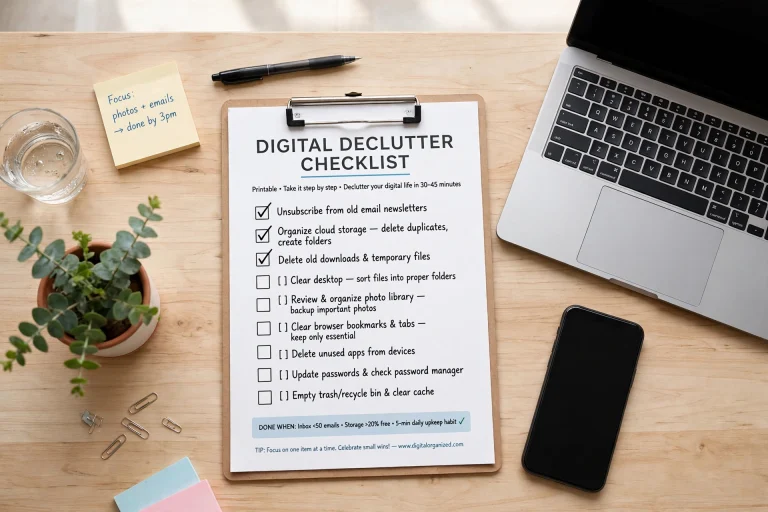
Digital Decluttering Tips for Files & Photos
Here’s how to fix it—without spending hours organizing.
✅ Create a “Delete Later” Folder
This is a simple but powerful solution.
Use this folder for:
- Screenshots
- Temporary files
- PDFs you need to read once
- Images you plan to upload elsewhere
Set a rule: empty this folder daily or weekly.
✅ Choose a Permanent Home for Downloads
Every file you download should have a clear destination:
- Work files
- Personal documents
- Photos
- Receipts
Creating a simple digital file organization system saves time and prevents future clutter.
✅ Keep a Clean Desktop Background
Use a minimal background that discourages clutter:
- Solid colors
- Simple gradients
- Clean images
Avoid busy wallpapers that “hide” icons and make clutter feel invisible.
✅ Organize Photos Regularly
Photos are one of the biggest sources of digital clutter on phones.
- Delete duplicates
- Remove blurry screenshots
- Use albums
- Back up and remove from your device
This is especially important for iPhone and Android storage cleanup.
2️⃣ Endless Internet Tabs (“I’ll Read That Later” Syndrome)
At some point, many of us reach tab overload.
Maybe it’s research.
Maybe it’s news.
Maybe it’s recipes, productivity tips, or articles you swear you’ll read later.
Then one day, your browser crashes—or worse, refuses to open another tab.
That’s when reality hits.
Why Too Many Tabs Hurt Productivity
An excessive number of open browser tabs:
- Increases mental fatigue
- Reduces focus
- Encourages procrastination
- Makes task switching constant
Each open tab represents unfinished mental business. Your brain keeps trying to remember what’s important and what’s not.
Digital Decluttering Tips for Browser Tabs
✅ Limit Open Tabs
Try limiting yourself to:
- 2–3 tabs for focused work
- 4–5 max if necessary
This single habit dramatically improves concentration.
✅ Save “Read Later” Content Intentionally
Instead of leaving tabs open:
- Save links in a Google Doc
- Use bookmarks
- Use a read-later app
Then schedule time to actually review them.
Ask yourself:
Will my life truly change if I read this right now?
If not, let it go.
✅ Close Tabs at the End of the Day
Make it a habit to start each work session with a clean slate. A fresh browser equals a fresh mindset.
3️⃣ Shiny Freebies, PDFs, and Email Subscriptions
Freebies are tempting.
Online courses, PDFs, guides, checklists, newsletters—there’s always something new promising to fix a problem instantly.
But here’s the truth:
Freebies are one of the biggest causes of email clutter and digital overwhelm.
Why Freebies Become Digital Clutter
Often, signing up for freebies:
- Creates inbox overload
- Leads to unopened emails
- Gives a false sense of progress
- Replaces action with consumption
You feel productive because you signed up—but nothing actually changes.
Over time, your inbox becomes flooded with:
- Welcome sequences
- Promotions
- Updates
- Reminders you don’t care about
This is how email clutter takes over.
Digital Decluttering Tips for Email & Subscriptions
Your inbox is one of the most controllable digital spaces you have. Treat it like a protected environment.
✅ Track and Reduce Subscriptions
Use tools like:
- Unroll.me
- Gmail’s subscription filters
Unsubscribe aggressively. You can always resubscribe later.
✅ Unsubscribe Without Guilt
Not enjoying the emails?
Unsubscribe.
This is digital self-care, not rudeness.
✅ Use Gmail Filters
Filters allow you to:
- Automatically label emails
- Skip the inbox
- Organize newsletters
This keeps your inbox clean and functional.
✅ Star or Flag Important Emails
Highlight emails from:
- Important people
- Essential services
- Brands you genuinely value
Decluttering isn’t about removing everything—it’s about making room for what matters.
4️⃣ Notifications, Alerts, and Constant Pings
Notifications are designed to steal attention.
Phones, laptops, smartwatches, apps—they all compete for your focus.
Left unmanaged, notifications become one of the most disruptive forms of digital clutter.
Why Notifications Are So Harmful
- They interrupt deep work
- They increase stress
- They fragment attention
- They train your brain to crave distraction
The good news?
You are in control.
Digital Decluttering Tips for Notifications
✅ Turn Off Unnecessary App Notifications
On iPhone:
- Settings → Notifications
- Disable “Allow Notifications” for non-essential apps
On Android:
- App notifications → Disable alerts you don’t need
Use banners instead of alerts when possible.
✅ Silence Social Media Alerts
Turn off:
- Facebook sounds
- Messenger alerts
- Instagram notifications
- Chrome pop-ups
Social media should be intentional—not intrusive.
✅ Use Do Not Disturb Mode
- Schedule focus time
- Enable Sleep Mode at night
- Use DND during work hours
On Mac:
- Control Center → Notifications → Do Not Disturb
✅ Disable Email Pop-Ups
Turn off:
- Outlook notifications
- Gmail desktop alerts
- Chrome reminders
Email doesn’t need to interrupt your thoughts.
Final Thoughts: Digital Decluttering Is a Lifestyle
Digital clutter doesn’t disappear overnight.
But with consistent habits, awareness, and intentional organization, you can create a stress-free digital life that supports focus, productivity, and mental clarity.
Start small:
- Clean one folder
- Unsubscribe from five emails
- Turn off unnecessary notifications
- Close extra tabs
Digital decluttering isn’t about perfection—it’s about control.
And once you experience a clean digital environment, you’ll never want to go back.
If several of these types have piled up at once, professional digital decluttering services can tackle them in one project.